

Executive Overview
Introduction
You must have heard of the phrase “Cloud Migration” somewhere in the meeting rooms, walking through the lobby or in a casual conversation in a moving lift. However, the technology and the phrase are not inherently Byzantine. Cloud has been one of the transformative technologies of the 21st century. The need for it arose when IT managers and CXOs realised that they were not optimally utilising the on-premises computing resources available and needed an IT infrastructure that could support the dynamic workloads of modern times, where customers were constantly looking for a novelty factor and demand fluctuations were a common denominator for every organisation, irrespective of size, industry and location. Cloud computing, with its operational model, introduced agility, reliability, and scalability into day-to-day operations. Before we discuss the steps, adoption, benefits, and challenges of cloud migration, let us first understand what it is.
What is Cloud Migration?
Cloud Migration is the process of moving your IT infrastructure, databases, or applications/workloads from on-premises to the cloud, or from one cloud to another. The strategic objective is to optimise existing infrastructure, reduce costs from excess capital expenditure, and introduce the flexibility to scale resources up or down based on dynamic business data. Cloud adoption and migration have surged over the last decade, as market statistics show. The global cloud migration services market was valued at USD 42 billion in 2025 and is expected to grow from USD 50.5 billion in 2026 to USD 224.7 billion by 2033, at a CAGR of 23.8% from 2026 to 2033.
By solution, cloud migration services are categorised into five: Infrastructure, Platform, Database, Application, and Storage. By service type, the services are categorised into professional and managed services.
Building the Business Case Before Migrating to Cloud
One common mistake many organisations still make is adopting the cloud for its own sake. Its implementation must drive transformative change within the organisation, not just incremental improvement. In the last few years, organisations have been exploring beyond FinOps that is focused on cost-cutting. Momentum is gradually building towards the business value that could be derived from cloud adoption. A survey found that 64% of organisations (up by 12%) assess progress against cloud goals by value delivered to business units.
Ideally, you should have a clear roadmap for assessing progress against cloud goals. These can include cost efficiency/savings, the number of workloads migrated, the pace of delivering new products/services, reduced data centre footprints, and value delivered to business units. Depending on the size and industry of the organisations, business goals can differ. Hence, it is essential to make informed decisions and know exactly what you aim to achieve.
Assessing the Existing Digital Estate and Workload Dependencies
Once you have complete clarity on the business goals, assessing the existing IT estate and workload/application dependencies is crucial to drive the next step. Start by listing the inventory of applications, databases, servers, storage, network dependencies and supporting infrastructure. Based on the preliminary assessment, identify the workloads that should be migrated as-is (Lift & Shift Approach), optimised only for cloud performance or modernised using the four pillars of cloud-native, i.e. Microservices, Containers, DevOps, and CI/CD.
The assessment of your digital estate also includes utilisation analysis, technical readiness, workload criticality, risk & time assessment, and migration scenario modelling. Once the existing IT estate and workload dependencies are thoroughly evaluated, the roadmap is clear on what to migrate, why it should move, where it should move, which migration method to use, and what business value it is expected to deliver.
Types of Cloud Migration Method
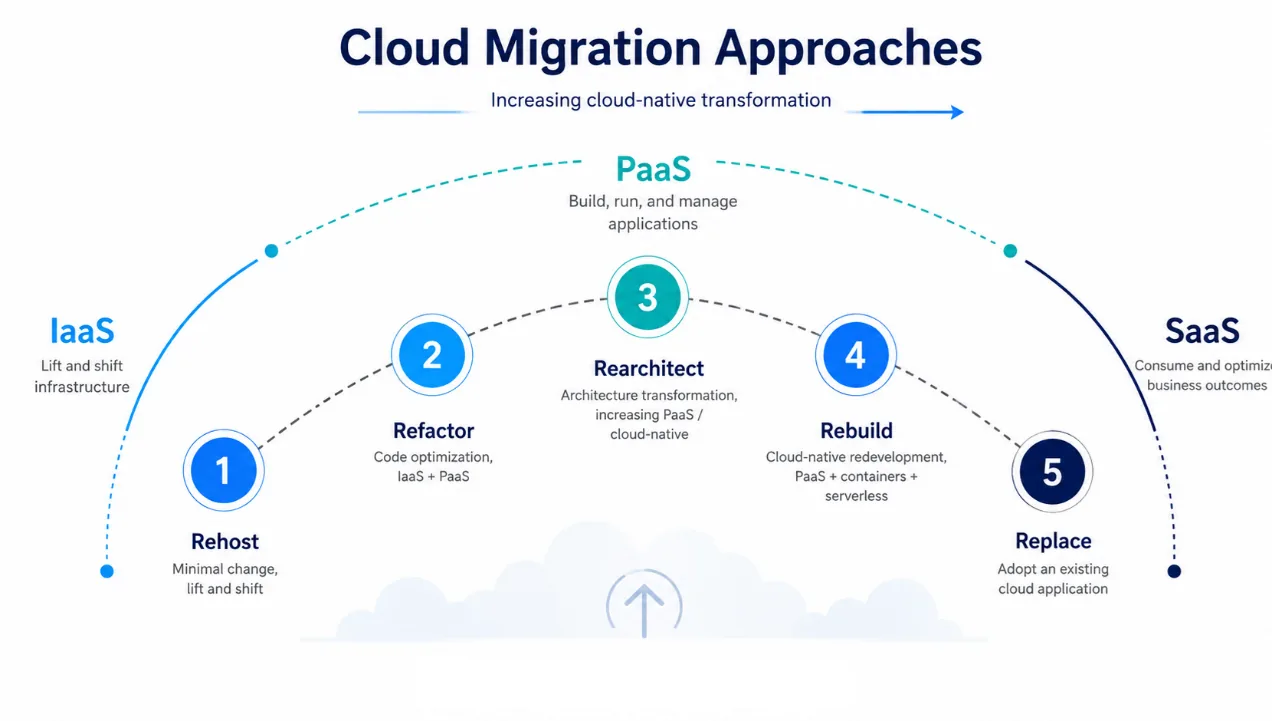
Now that the pre-migration phase is over and you’ve identified the workloads and the reason to migrate them, there’re 5 available options (also known as 5R’s) for Migration:
1. Rehost
Rehost: popularly known as Lift-&-Shift migration, it moves an existing workload to a selected cloud provider, effecting minimal changes to the entire architecture. The value proposition is reduced capital expense, smaller data centre footprints, and greater ROI on cloud investment.
Example: A mid-sized retailer running its ERP and inventory applications on ageing on-premises VMware servers moves the virtual machines to Azure VMs or AWS EC2 without changing the application code.
2. Refactor
Refactor: It involves refactoring application code to capitalise on the new business opportunities. This approach enables faster updates, improves code portability, and increases cloud cost efficiency across resources, speed, and costs.
Example: An online travel company moves its existing application to the cloud but refactors parts of the code to use managed databases, caching, autoscaling and serverless services instead of maintaining dedicated infrastructure.
3. Rearchitect
Rearchitect: Legacy applications not supportive of complete migration are rearchitected here to unlock cost and operational efficiencies in the cloud or in a hybrid environment. This approach stands out by delivering the much-needed application agility and scalability, leveraging a mix of technology stacks.
Example: A financial-services company has a monolithic loan-processing application that struggles when transaction volumes spike. Instead of simply moving it to the cloud, the company breaks the application into microservices, containerises key components and introduces APIs and event-driven processing.
4. Rebuild/Renew
Rebuild/Renew: Sometimes byzantine and misaligned workloads get too complex to support smooth migration. In such scenarios, a new codebase with a fresh, cloud-native rebuild design is your best bet. This approach enables faster innovation, quicker app build-up, and lower operational costs.
Example: A logistics company relies on a 15-year-old shipment-management application whose codebase is difficult to maintain and cannot support mobile tracking, real-time analytics or API integrations. Rather than migrating the old application, it builds a new cloud-native shipment platform using managed databases, APIs, serverless functions and modern web/mobile interfaces.
5. Replace
Replace: In exceptional situations, the practical decision is to completely replace the existing applications with hosted applications catering to all the cloud functionality.
Example: A growing business runs an ageing internally developed CRM on its own servers. Instead of migrating and maintaining that application in Azure or AWS, it replaces it with a SaaS platform such as Microsoft Dynamics 365 or Salesforce. Historical customer data is migrated into the new platform, and the old application is retired.
Building an on-premises vs. cloud Comparison
Before migrating or modernizing to the cloud, it is crucial that you perform a competitive analysis. The table below provides a comprehensive comparison between on-premises and cloud hosting:
| Parameter | On-premises | Cloud |
|---|---|---|
| Cost Structure | Capex-centric: High initial investments, predictable cost at high volume | Opex-centric: Pay-as-you-go; cost-effective for bursty workloads but scales rapidly with token consumption |
| Scalability | Rigid: upgrading requires hardware procurement, delivery, rack installation, and provisioning | Instant: Scale instances (e.g., AWS EC2, Azure VMs) up or down in seconds using automated APIs. |
| Hardware Access | Sovereign hardware: You own the physical silicon with zero risk of allocation throttling. | Shared capacity. Subject to global cloud GPU shortages, capacity limits, or spot-instance terminations. |
| Data Egress Fees | Zero egress fees. Massive localized datasets can interact with AI models at zero network transit cost. | High egress friction. Moving massive data out of the cloud ecosystem or between multi-cloud networks results in high transit costs. |
| Latency & Network | Ultra-low latency (<50ms). Ideal for processing real-time localized data streams via edge computing or internal LAN networks. | Variable latency. Subject to public internet speeds, routing paths, and proximity to regional data centers. |
| Maintenance Overhead | High internal burden. Your internal IT and dev teams handle physical server failures, power outages, and HVAC cooling | Zero maintenance. The cloud provider automatically absorbs all hardware maintenance and system upgrades seamlessly. |
| Deployment Speed | Slow time-to-market. Building data centers, validating power footprints, and structuring networks delays initial deployment. | Rapid deployment. Spin up managed AI environments (like Amazon SageMaker or Google Vertex AI) in just a few clicks. |
Table 1: On-premises vs Cloud Comparison
Final Verdict: On-premises has an edge with high-volume production & Data Protection at the core. Cloud wins for burst workloads & rapid innovation scenarios.
Go, Defer, Modernize or Retain: The Final Decision Gate
Ultimately, cloud migration is a business decision, not merely an infrastructure shift. The right approach depends on workload criticality, cost, scalability, security, compliance, application dependencies, and long-term business value. Organisations should avoid migrating simply because cloud adoption is accelerating across industries. Instead, every workload should pass through a clear decision gate: migrate, modernise, retain, or defer. A well-defined business case, supported by digital-estate assessment, cost modelling, migration-method selection, and measurable success criteria, helps ensure that cloud investments deliver long-term business value rather than simply relocating existing inefficiencies to a new environment.

Anand Rao
Lead Architect – Cloud & Infrastructure
Anand Rao is the Lead Architect for Cloud & Infrastructure at Vortiqo Technologies, specialising in sharing practical insights for IT leaders navigating hybrid and multi-cloud journeys. With over a decade of experience driving digital transformation, he writes about cloud strategy, modernising infrastructure, and the future of enterprise tech.